Staff Turnover and Software Access Recovery in Nonprofits
Nonprofits need systems to recover software access when staff leave.

Sponsored by Quwa Labs
- Written by
- Nonprofit Tech Desk Editors
- Published
- October 16, 2026
- Reading time
- 8 min read
- Sources cited
- 2 sources ↓
What this covers
- Why nonprofit turnover stays elevated even after the pandemic peak
- How each departure becomes a software access event the organization rarely tracks
- What goes wrong when access events go unmanaged — lockout and exposure
- Why software built or adopted without governance becomes a liability at the moment of departure
Every departure changes who can use, manage, and recover the organization’s tools. Access recovery needs to be part of everyday operations, through a maintained inventory, predictable offboarding, and systems that remain manageable when the person who set them up leaves.
Why nonprofit turnover stays elevated even after the pandemic peak
Nonprofit turnover has eased from its worst years, but that does not make it a temporary disruption. Candid's SISR survey’s fall 2024 findings found that two-thirds of nonprofit employees were looking for new jobs or planned to within a year. That was down from the 2023 peak but still well above all-industry averages. Only roughly a third planned to definitively stay in the sector. The roles at greatest risk included marketing, programs, fundraising, and administration and operations, where staff often manage accounts and hold system credentials.
PNP Staffing Group's 2026 survey found that turnover normalized for roughly half of organizations in 2025 but remained elevated in fundraising and finance. Most organizations increased salaries to compete, leaving thin margins for other investments. Wipfli's 2026 nonprofit outlook points to another strain as leadership passes from one generation to the next in organizations that have fewer middle managers and take longer to hire than their private-sector peers. Institutional knowledge can therefore leave at the top as well as the front line. With inadequate pay, excessive workloads, and limited growth paths still driving departures, organizations without deliberate countermeasures should plan for continued churn.
How each departure becomes a software access event the organization rarely tracks
Each departure is an access event, a change in who should be able to enter and administer the organization’s systems. One departing employee may hold credentials for a CRM, donor database, cloud storage account, grant management platform, social media scheduler, and email service. Custom internal tools can add more accounts to that handoff. Yet most nonprofits have no formal process that turns a departure into a complete set of access changes. The employee leaves on a known date, while their access remains spread across tools.
The same mismatch applies to board members, seasonal staff, program hires, and volunteers. A grant writer may still have database access years after a project ends, while a former board member’s email account stays active. With each cycle, permissions accumulate because adding access has no corresponding removal process. At the same time, knowledge of how to enter or manage an account may leave with its only administrator. These are opposite failures, which are exposure through access that persists and lockout through access the organization loses.
Fragmentation makes both failures harder to catch. Wipfli's 2026 outlook notes that many nonprofits rely on outdated systems and fragmented data sources. Without a shared record of those systems, an organization may not know where accounts exist.
What goes wrong when access events go unmanaged — lockout and exposure
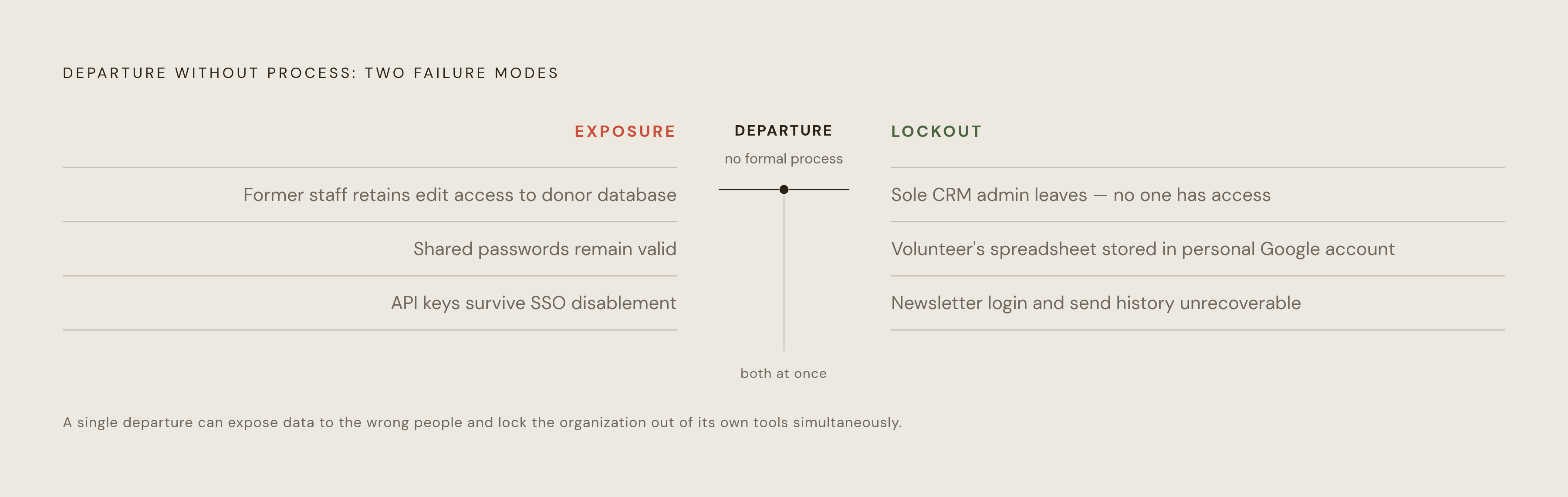
Consider a fundraising director who leaves as the sole administrator of the donor CRM. The successor needs the vendor’s help to reset the account, which may take days and require proof that the organization owns it. The organization still needs the tool and pays for it, but the successor still has to wait to take control. A grant tracking spreadsheet that a volunteer built and stored in a personal Google account can be even harder to recover. If it leaves with the volunteer, the data may be unrecoverable.
The same lockout can happen with a program newsletter that uses a former manager’s personal credentials. The list, login, and sending history become inaccessible together. Exposure works in the other direction, as when a former staff member retains edit access to a donor database without a business reason to use it. Passwords shared informally add to the problem because everyone who knew a password can still use it until it changes. API keys, integration credentials, and service account tokens can also survive after an SSO account is disabled.
These scenarios show why recovering a password is only part of the work. Experienced staff also carry the undocumented reasons that a tool was configured a particular way. Their successor may regain access without understanding the system well enough to administer it.
Why software built or adopted without governance becomes a liability at the moment of departure
The gap often begins when a tool is adopted. A staff member signs up for a free tier to solve an immediate problem, using a personal or work email address. There is no secondary administrator, shared credential storage, or organizational record of the account. As long as that person is around, this may seem to work well enough. Departure reveals that the person was also the organization’s only access plan.
Custom tools can make that dependence deeper. A donor portal, volunteer tracker, or case management system may have been built by a staff member or short-term contractor who holds all the context. That person knows where the data lives, how the tool connects to other systems, and what it does technically. Without documentation, the next person cannot reliably reset credentials, revoke others’ access, or migrate data.
This is a predictable result of under-resourced teams moving quickly to deliver programs, rather than a moral failing by the person who found a solution. The person who adopted the tool and the person now responsible for it are separated by a departure. Governance closes that gap by making ownership and administration independent of individual memory. Without it, each undocumented shortcut leaves another hole in the access recovery map.
Building an access inventory before turnover happens
The first practical step is to create a maintained inventory of every tool, account, and administrator. Include free-tier accounts, paid subscriptions, and tools that staff adopted without formal procurement. For each account, record the registration email and flag whether it belongs to a person or the organization. Record who has admin rights and whether someone else is the secondary admin. These fields establish both where access exists and whether it can survive a departure.
The inventory also needs to show where credentials are stored. That may be someone’s memory, a personal password manager, a shared spreadsheet, or a team password manager. Include the API keys, integration tokens, and service accounts tied to those tools so the record covers more than ordinary logins. A simple shared spreadsheet can be built in an afternoon and is better than having no map at all.
For a small team, this can look like overhead competing with program work. But the initial setup replaces repeated searches during departures, even though the record still needs maintenance. Register tool accounts to role-based or organizational email addresses, such as admin@organization.org, rather than personal addresses, and designate a secondary admin for every critical tool. Microsoft for Nonprofits' tenant access recovery documentation explains that getting admin control back requires proof that the organization owns the account. That requirement makes the value of preventive redundancy concrete, because an existing second administrator can preserve access before recovery becomes necessary.
Embedding access revocation into the offboarding process
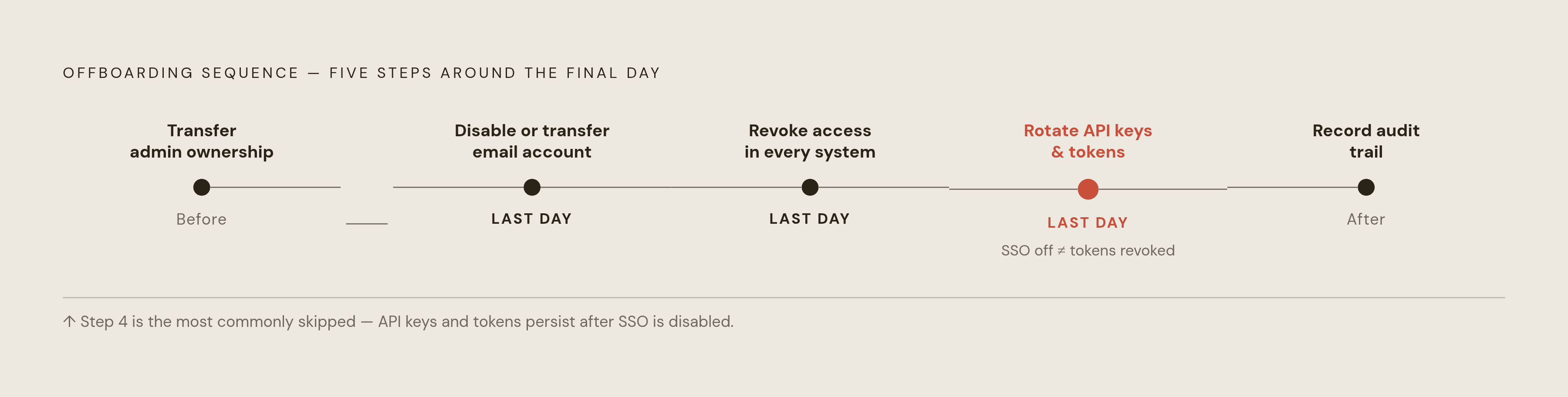
With the inventory in place, offboarding becomes the predictable moment to act on it. Use a standard access checklist owned by a named role rather than a named person, so responsibility transfers when the HR or operations lead changes. Even careful offboarding can miss accounts that nobody knows about, so the checklist needs the inventory. The checklist helps the organization keep control of its tools while removing access from people who should no longer have it.
Before the last day, transfer ownership of any tool where the departing employee is the sole admin. On the final day, disable or transfer the employee’s organizational email account. Walk through the inventory and revoke or transfer access in every system where that person appears. Rotate shared passwords they knew, and check the API keys and integration tokens tied to their accounts to see which need rotation or revocation. Disabling the main login is not a substitute for addressing those separate credentials.
Complete the checklist by recording what was done, by whom, and on what date. That audit trail shows whether the organization acted quickly if questions come up later. Timing matters because delayed revocation leaves the very window of exposure the process is meant to close. Use the same process for volunteers and board members, even when they have access to fewer systems. The scope may be smaller, but a different relationship should not mean an absent handoff.
Choosing and configuring tools so they survive personnel changes
At adoption, make organizational registration and at least two named admins per critical tool standard requirements. Prefer role-based access controls so one person’s permissions can be narrowed or removed without disrupting others. Enable SSO, or single sign-on, where available so disabling an organizational account cascades to connected tools. Document this limit clearly, because API keys and service tokens still need to be managed on their own.
Airtable offers a practical example of how product choices affect this work. It is a common no-code database choice for small nonprofits, and its Team and Business plans charge per user when billed annually. Someone must reclaim seats each time staff leave, so managing seats is an ongoing task. Data also lives on Airtable’s servers, creating a vendor dependency that matters if the organization loses admin access.
Self-hosted alternatives change that arrangement by giving the organization control over where data lives and removing per-seat pricing as a source of churn-related work. NocoDB is a self-hosted option that ships under a Sustainable Use License as of January 9, 2026. Baserow is self-hostable and open-core, with a permissively licensed core, proprietary premium/enterprise add-ons, and GDPR, HIPAA, and SOC 2 compliance support. Notion offers a different approach where database and documentation needs overlap, embedding databases inside document pages and reducing the number of separate tools to manage.
When the system itself needs to change, not just the process around it
Process has a limit when the underlying system cannot support a handoff. Warning signs include being unable to list the organization’s software and having critical accounts registered to personal addresses that only the vendor can change. A custom tool with no documentation, known owner, or person who understands its workings presents a deeper problem. If its contractor is unreachable, the organization may have working software that it cannot audit, modify, maintain, or recover. A checklist can record that condition, but it cannot repair it.
The next step depends on the foundation. For a commercial platform such as Airtable, Google Workspace, or a CRM, better admin configuration, organizational email, and an access inventory are usually sufficient. For a custom-built internal system with no documentation and no maintainer, rebuilding on a documented, maintainable foundation is the path to real access governance. Wipfli's 2026 nonprofit trends analysis says nonprofits now need digital transformation because fragmented systems make it harder to compete for donors and show that they are accountable for their finances. Access recovery belongs within that operational question.
Getting to launch and staying operational are different standards. A custom tool that launched without documentation or a proper handoff has met only the first, and meeting the second requires engineering work. A long-term technical partner can provide continuity through current documentation and a second holder of admin credentials, instead of leaving an orphaned system after a one-time engagement. The lasting test is whether the organization can still control and maintain its tools after the people who introduced them are gone.
This article is sponsored by Quwa Labs.
Methodology & sources
- The people behind nonprofit impact
Provided the fall 2024 survey finding that two-thirds of nonprofit employees were looking for new jobs, along with data on which roles faced the greatest turnover risk.
- Tenant Access Recovery - Microsoft for Nonprofits
Explained that regaining admin control of a Microsoft tenant requires proof of organizational ownership, illustrating the concrete value of maintaining a secondary administrator before recovery becomes necessary.